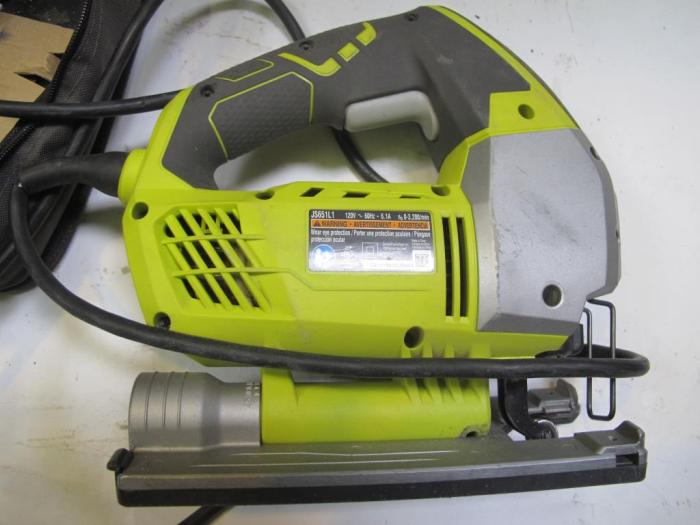
Ryobi One+ Jigsaw – Orbital Jig Saw – Ryobi stands out in the woodworking and DIY community as an essential power tool that combines versatility and performance. With its user-friendly design and impressive features, this jigsaw is engineered for both the novice and seasoned craftsman alike. The integration of the One+ battery platform enhances its appeal, allowing seamless compatibility with a range of Ryobi tools, making it a smart addition to any toolkit.
From its ergonomic grip to the variable speed control, the Ryobi One+ Jigsaw ensures precision and comfort during operation. Whether you’re tackling straight cuts or intricate curves, this tool is designed to meet diverse cutting needs with ease, making it a reliable choice for various projects.
Overview of the Ryobi One+ Jigsaw
The Ryobi One+ Jigsaw is a versatile and powerful tool designed for both DIY enthusiasts and professional woodworkers. It stands out due to its rich features and specifications that make cutting various materials effortless and precise. This jigsaw offers a compact design, lightweight build, and a user-friendly interface that enhances the overall user experience. The significance of the One+ battery platform lies in its compatibility with over 175 other Ryobi tools, providing convenience and flexibility for users who prefer to work with multiple power tools.
Features and Specifications
The Ryobi One+ Jigsaw is equipped with a robust set of features, including:
- Tool-free blade change system for quick and easy blade replacements.
- Orbital action with multiple settings to tackle different cutting applications.
- Variable speed control ranging from 0 to 3,000 strokes per minute for precise cutting.
- Integrated dust blower to keep the cutting line clear for improved visibility.
- Ergonomically designed handle for comfort during prolonged use.
Design and User Interface
The design of the Ryobi One+ Jigsaw emphasizes user comfort and usability. With its lightweight structure, it is easy to maneuver without causing fatigue. The user interface features clearly labeled controls, making adjustments straightforward even for beginners. The rubberized grip of the handle enhances control, reducing the likelihood of slippage during operation.
Key Features of the Orbital Jig Saw
Orbital jigsaws are known for their ability to perform various cutting tasks, and the Ryobi One+ Jigsaw delivers on this front with several key features.
Orbital Settings
The Ryobi One+ Jigsaw offers multiple orbital settings, each corresponding to different cutting needs:
- Setting 1: Suitable for fine cuts in delicate materials.
- Setting 2: Ideal for general-purpose cutting.
- Setting 3: Best for aggressive cuts in thicker materials.
Blade Changing System
The tool-free blade changing system is a major convenience for users. This feature allows for quick replacement of blades without any additional tools, minimizing downtime and maximizing productivity.
Variable Speed Control
The jigsaw’s variable speed control significantly impacts cutting precision. Users can adjust the speed based on the material being cut, ensuring clean cuts and reducing the risk of splintering or tearing.
Performance Analysis
The performance of the Ryobi One+ Jigsaw can be compared favorably against other jigsaws in its category.
Cutting Performance Comparison
When compared to other jigsaws, the Ryobi stands out for its consistent performance across various materials. It effectively cuts through:
- Wood (soft and hardwood)
- Plywood
- Plastic
- Metal (with appropriate blades)
Vibration Control Features
The jigsaw includes advanced vibration control features that enhance user comfort during operation. By minimizing vibrations, users can maintain better control over the tool, leading to improved cutting accuracy and reduced fatigue.
User Experience and Feedback
User testimonials highlight the satisfaction of those who have used the Ryobi One+ Jigsaw.
User Testimonials
A selection of user experiences includes:
- “This jigsaw is a game changer for my home projects!”
- “I love how easy it is to switch blades.”
- “The variable speed makes cutting so much easier!”
Praises and Criticisms
| Praises | Criticisms |
|---|---|
| Lightweight and easy to handle | Battery life can be improved |
| Quick blade changes | Noise level can be high |
Maintenance and Care
Proper maintenance is crucial for the longevity of the Ryobi One+ Jigsaw.
Recommended Maintenance Practices
To keep the jigsaw in optimal condition, users should:
- Regularly check and tighten screws and bolts.
- Lubricate moving parts as needed.
- Store the tool in a dry place to prevent rusting.
Changing Blades Safely
Changing blades should be done with care. Here’s a step-by-step guide:
- Ensure the tool is powered off and battery is removed.
- Press the blade release lever to eject the old blade.
- Insert the new blade until it clicks into place.
- Double-check that the blade is secure before use.
Usage Tips and Techniques
To achieve the best results, consider the following techniques and tips.
Techniques for Clean Cuts
Achieving clean cuts requires attention to detail. Users can follow these techniques:
- Use a fine-toothed blade for thinner materials.
- Maintain a steady hand and a consistent speed.
- Clamp the material securely to prevent movement.
Best Practices for Setup
Setting up the jigsaw correctly is essential. For specific cuts:
- Straight cuts: Use a guide for precision.
- Curved cuts: Move slowly and follow the line carefully.
Safety Tips
To ensure a safe working environment:
- Always wear safety goggles.
- Keep hands away from the cutting area.
- Ensure the work area is clean and free of obstacles.
Accessories and Enhancements
Enhancing the functionality of the Ryobi One+ Jigsaw is possible with various accessories.
Available Accessories
The following accessories can improve the jigsaw’s performance:
- Additional blade types for diverse cutting tasks.
- Jigsaw stands for stability during operation.
- Guide rails for straight cuts.
Blade Types and Applications
Different blades serve specific purposes:
| Blade Type | Application |
|---|---|
| Wood Blade | For cutting wood and plywood. |
| Metal Blade | For cutting metal sheets and pipes. |
Troubleshooting Common Issues: Ryobi One+ Jigsaw – Orbital Jig Saw – Ryobi
Users may encounter some common problems with the Ryobi One+ Jigsaw.
Common Problems and Solutions, Ryobi One+ Jigsaw – Orbital Jig Saw – Ryobi
Here are some issues and how to resolve them:
- Blade not cutting: Check if the blade is dull or improperly installed.
- Excessive vibration: Ensure the blade is secured properly and use a suitable blade type.
- Tool overheating: Allow the tool to cool down and avoid prolonged use without breaks.
Contacting Customer Support
For further assistance, users can:
- Visit the Ryobi website for support resources.
- Contact customer service through the provided phone number or email.
- Access warranty services as needed.